Monday, February 3, 2014
Privacy Policy
While this app may access the Internet, it will not be collecting information or reporting back to a central server.
This app complies with applicable laws and regulations

Tuesday, October 15, 2013
Windows 8 / Mobility Presentation Links
Hey there!
I hope you enjoyed my presentation on Windows 8 and mobile development. Here is a list of the links and other information.
Twitter: @WhatsTheBigIT
@WhatsTheBigITFacebook: WhatsTheBigIT
https://www.facebook.com/WhatsTheBigITWindows Store App Builder Info
https://build.windowsstore.com/?ocid=GenApp_Store_Start_Now_Footer#fbid=LcuYCAZIHT0Windows 8 Design handbook
www.windows8designhandbook.comMicrosoft MSDN
http://msdn.microsoft.comMicrosoft Channel 9
http://channel9.msdn.com/BUILD Conference
http://www.buildwindows.comMicrosoft Virtual Academy
http://www.microsoftvirtualacademy.comMicrosoft DreamSpark Program
http://www.DreamSpark.comMicrosoft Imagine Cup
http://www.imaginecup.com/Daugherty Business Solutions
http://www.Daugherty.comPluralsight
http://www.Pluralsight.comNokia Dvlup Program
http://www.dvlup.comLance McCarthy (Nokia Developer Ambassador)
@lancewmccarthyPluralsight
http://www.pluralsight.comIBM Developer Works (for java)
http://www.ibm.com/javaGoogle Developers (for Android)
http://developers.google.comXamarin (Cross platform development)
http://www.xamarin.comPhone Gap (Cross platform development)
http://www.phonegap.comCordova (Cross platform development)
http://cordova.apache.orgTuesday, July 9, 2013
Dynamic Directives with Angular
Having recently embarked on a Single Page Application (SPA)
for one of my clients, the technology landscape is pretty vast. Without going into much detail, I settled on AngularJS
as one of the many javascript libraries. Angular is pretty robust with a wealth of options required of spas.
[I looked at a few others, such as KnockoutJS and Durandal. While these are great JavaScript libraries, I found Angular provided most of the functionality I needed in a single JavaScript package.]
One angle of Angular is the concept of directives. Directives, in a nut shell, are ways for the developer to build custom html tags, or add features to existing tags. The purpose of this post is not to go into all of the details of directives, but to focus on one particular hurdle I recently had to overcome.
First, I’ll start with the data. In this example, I have an array of five objects. The only notable thing is the driverType. There are three different types, which will determine the Angular Directive I wish to present to the user. The types are driverOne, driverTwo, and driverThree. Nothing special.
The array of objects is available to my HTML by way of an Angular $scope. It is injected into my view’s controller and can be accessed from any number of ngViews for my SPA. If you are not familiar with ngView, there are a number of good resources on the web. Views are a pillar of SPAs, so it is best that you become familiar with them.
The magic for dynamic directives comes into play with three angular directives,
The first thing I want to do is iterate over my driver collection. I’ll use a simple repeater:
Within my repeater, I’ll use the ngSwitch to selectively make use of the three different custom Directives. The switch will be on each driver from the driver repeater.
Now all I need to do is identify each condition, or driverType.
Creating custom directives is a fantastic way to help provide a separation of concerns within your web based application and to provide the potential for reusability. Directives are also a great way to provide a means for testing your code, which is always a good idea. I hope this post was helpful and sparked options for the dynamic, data-driven, aspects for your own Single Page Application.
Follow @WhatsTheBigIT
[I looked at a few others, such as KnockoutJS and Durandal. While these are great JavaScript libraries, I found Angular provided most of the functionality I needed in a single JavaScript package.]
One angle of Angular is the concept of directives. Directives, in a nut shell, are ways for the developer to build custom html tags, or add features to existing tags. The purpose of this post is not to go into all of the details of directives, but to focus on one particular hurdle I recently had to overcome.
Problem: The information I need to display to the user must be in a variable format, based on an attribute of the object. Each view variation is presented by a related custom Angular directive.
It can be challenging to dynamically assign the correct Template, or TemplateUrl from within the actual directive. I needed a way to select the correct directive for each row of data and render them all on the screen at the same time.
First, I’ll start with the data. In this example, I have an array of five objects. The only notable thing is the driverType. There are three different types, which will determine the Angular Directive I wish to present to the user. The types are driverOne, driverTwo, and driverThree. Nothing special.
function fetchDriverData() {
return [
{ id: '001', name: 'Sample Data1', driverType: 'driverOne' },
{ id: '002', name: 'Sample Data2', driverType: 'driverTwo' },
{ id: '003', name: 'Sample Data3', driverType: 'driverThree' },
{ id: '004', name: 'Sample Data4', driverType: 'driverOne' },
{ id: '005', name: 'Sample Data5', driverType: 'driverTwo' }
];
}
The array of objects is available to my HTML by way of an Angular $scope. It is injected into my view’s controller and can be accessed from any number of ngViews for my SPA. If you are not familiar with ngView, there are a number of good resources on the web. Views are a pillar of SPAs, so it is best that you become familiar with them.
The magic for dynamic directives comes into play with three angular directives,
The first thing I want to do is iterate over my driver collection. I’ll use a simple repeater:
<div ng-repeat
="driver in
drivers">
Within my repeater, I’ll use the ngSwitch to selectively make use of the three different custom Directives. The switch will be on each driver from the driver repeater.
<div ng-switch="driver.driverType">
(Remember: drivers is the collection and driver represents a single item within the collection)
Now all I need to do is identify each condition, or driverType.
<
div
ng-repeat
="driver in
drivers">
<
div
ng-switch
="driver.driverType">
<
div
ng-switch-when
="driverOne"><
div
class
="driver-directive-one"
driver
="driver"></
div
></
div
>
<
div
ng-switch-when
="driverTwo"><
div
class
="driver-directive-two"
driver
="driver"></
div
>
</
div
>
<
div
ng-switch-when="driverThree"><
div
class
="driver-directive-three"
driver
="driver"></
div
></
div
>
<
/div
>
<
/div
>
The highlighted div tag represents one of my custom directives, driverDirectiveTwo
Creating custom directives is a fantastic way to help provide a separation of concerns within your web based application and to provide the potential for reusability. Directives are also a great way to provide a means for testing your code, which is always a good idea. I hope this post was helpful and sparked options for the dynamic, data-driven, aspects for your own Single Page Application.
Follow @WhatsTheBigIT
Wednesday, May 29, 2013
Pssst! Developer, Be a Family Superhero
 I know your idea of a vacation would be to stay at home, watch Pluralsight videos, then work on your billion-dollar app idea. That’s fine, but it stinks for the rest of your family. Do they really want to stay at home while you listen to John Papa? Heck no!
You will end up at some beach or touristy attraction with your laptop in the hotel room. The end result is probably a fun vacation, but little progress will be made on your techie ideas. There has to be a way to feed your developer needs AND have fun for the whole family.
Everyone likes water parks. Right? Why not take your family to the famous Wisconsin Dells and stay at the Kalahari Resort? From August 12th – 14th, That Conference will be hosted at the Kalahari Resort. Yes, you heard me correctly. One of the top developer conferences will be at the Kalahari. The perfect place to end summer vacations and have one last splash before schools resume.
This is the ultimate win-win scenario for techies and their families. You get to attend high quality training and your family gets to enjoy some of the world’s best water attractions. Pause, for just a moment, and let this soak into your brain.
Water parks. Family fun. Developer conference. YOU, being a family superhero! (did I mention water parks?)
Register, today. Tell them “The BigIT” sent you!
http://www.thatconference.com
Updated on June 10, 2013!!!
Get discounted air fare here
Follow @WhatsTheBigIT
Tuesday, May 21, 2013
Mark Your Calendar, November 14-16
Years ago, the backbone of the Midwest was agriculture. Fertile fields fed the world. Today, the Midwest is growing more than just corn, wheat, and soybeans. The Midwest is growing businesses. The Corn Belt is attracting a large number of start-ups, venture capitalists, and technologists. As technology becomes a key player, some have labeled the Midwest, the Silicon Prairie. This November, one of the largest technology conferences in the Midwest will be held in heart of the Silicon Prairie, St. Louis.
The St. Louis Days of Dot Net conference will completely overtake the Ameristar Casino & Resort on November 14-16. This premier event is an excellent opportunity to network with technology companies, technologists, and software engineers. If you are interested in becoming a sponsor, shoot me an email; or, you can wait until the official sponsor drive opens. Follow me on Twitter to keep yourself up-to-date on this awesome opportunity.
Follow @WhatsTheBigIT
St. Louis Days of Dot Net
Wednesday, May 8, 2013
Midwest Developer Conferences
Who says you have to go to the coasts to attend a top
quality technical conference? Four of
the best developer conferences will be located in the middle of the United
States! You KNOW you want to be there!
August 12-14 That Conference @ Wisconsin Dells, WI
August 28-30 DevLink @ Chattanooga,
TN
September 18-20 Strange Loop @ St. Louis, MO
November 14-16 St. Louis Days of .NET, St. Louis, MO
Saturday, March 2, 2013
Building Combat Simulators
My day job is in consulting where I help my clients solve problems using tools and techniques in the IT field. In the evenings and weekends, I teach college level computer science classes. Teaching classes in the evenings and on weekends can be especially trying. The difficultly comes from people being tired by the end of the day, or have difficulty finding the motivation to come to school on the weekend. To help motivate people in my more advanced classes, I have come up with some creative ways of instruction.
For one of my classes, I tell the students on the first day of class there will be no homework assignments the entire semester. I also tell them there will be no formal midterm or final exam. After saying this, I can tell all eyes are on me and I have their full attention. I then inform everyone their grade will be based on only three assignments.
The first assignment is to construct a combat simulator. The name, alone, sounds exciting! The combat simulator will include an arena and two fighters. The goal of the simulator is to battle two fighters until there is only one standing. You can see the wheels spinning in the students’ heads. Once this idea soaks in, I explain the grading technique.
The combat simulator, and the other two projects in my class, will be graded cafeteria style. I hand out the list of grading possibilities. For example, a student can earn up to ten points for correctly using an interface. Fifteen more points can be awarded for using an abstract class. Twenty points can be received for implementing their own custom exception; this includes creating the class, throwing the custom exception, and catching it. There are several other possibilities for earning points. The final grade for the project is based on a total accumulation of points.
Programming is just one aspect of the assignment. The students must also document and present their projects to the class. They can earn 10 points for documentation and another 15 points for their presentation. When they give their presentation, I encourage the students to give an overview of their project and pretend the audience knows little about the assignment. They then should demonstrate their simulators, highlight parts of their code, then field questions from the audience.
The purpose of the presentations is to give my students some experience presenting a technical subject to an audience. It also reinforces the fact they have to do their own work. I let them know, from the beginning, how awkward it will feel if they are asked questions about a method and can’t explain it. I also let them know I would rather see them stumble in front of the class, as to stumble in front of a client, employer, or a financial backer hoping to fund their start-up. Their code demonstrations also help them get a feel for demonstrating software.
I have used the combat simulator for a number of years and have found it to be very successful in a number of areas. From a technical perspective, this program helps students to better understand the concepts of interfaces, abstract classes, inheritance, and exceptions. The format of the assignment allows the students to be creative and come up with their own designs, some of which have been very unique. The demonstration aspect helps them present in front of people and to work on communication skills.
You may recall, I mentioned there is no homework in my class. I’ve found students spend more time working on their project than they might spend working on small homework assignments. I’ve also noticed students are more motivated when they can work on a project of their own direction. Having a creative aspect tends to keep their interest.
If you would like more information about my combat simulator project, or other aspects of teaching, feel free to send me an email.
Tuesday, February 5, 2013
Quality and Quantity
If you spend any time reading the tech press, you will undoubtedly come across some critic bashing Windows Phone 8, or Windows 8. The two most common themes seem to be the lack of apps and the lack of a start button. Both of these complaints are simply ridiculous.
Let me first start with the lack of apps for the Windows Phone 8. What are you looking for that does not already exist? If your favorite app does not exist, then what have you done to help? Did you contact the maker of the app and ask them if they are planning a Windows Phone 8 port? If enough people ask for the Windows Phone 8 version, perhaps they will deliver. Maybe this is YOUR opportunity to capitalize on another’s short-sided perspective.
While I’m on the topic of Windows Phone 8 apps, I would like to ask the critics how long they should expect it to take for the development of a quality app? Do you want some shoddy code expedited so you can have a half-baked solution? Keep in mind, the public release of the Windows Phone 8 SDK has only been out for a few months. A good, quality, app can take months to build, especially if the developers are working on their spare time (evenings and weekends). Maybe we should revisit the quantity/quality situation in a few more months.
Enough about Windows Phone. Let me turn to the Windows 8 operating system. I’ll call it out right now. There is NO start button. We now have a start screen and live-tiles are an added bonus. All of the Windows 7 applications I use work just fine with Windows 8. This notion of a double headed operating system is blown way out of proportion. It seems, to me, some of these critics are overly critical and are grasping at straws for some good-ole Microsoft bashing. Give the start screen a chance, like you did the start button on Windows 95. I'll give you the BigIT guarantee you will grow to love it.
Looking at things from a developer’s perspective, Windows 8 and Windows Phone 8 are just fine. I frequently work with c# and Java, using Visual Studio 2012 and Eclipse. No problems. Windows 8 is more stable on my laptop and I enjoy ALL of the little enhancements Microsoft made to the user interface. Windows 8 works great, even without a touch screen. Developing for Windows Phone 8 is also very nice and the new emulator is fantastic. I'd even say it is better than the Android Emulator (and faster, too).
Ok, that is enough of a rant. I hate to be so negative! I’ll conclude this writing on a positive note regarding Windows 8 development. App development is a pure pleasure. Visual Studio 2012 + XAML + c# + Windows Phone 8 = software developer bliss!
Microsoft brought the FUN back to software development!
Let me first start with the lack of apps for the Windows Phone 8. What are you looking for that does not already exist? If your favorite app does not exist, then what have you done to help? Did you contact the maker of the app and ask them if they are planning a Windows Phone 8 port? If enough people ask for the Windows Phone 8 version, perhaps they will deliver. Maybe this is YOUR opportunity to capitalize on another’s short-sided perspective.
While I’m on the topic of Windows Phone 8 apps, I would like to ask the critics how long they should expect it to take for the development of a quality app? Do you want some shoddy code expedited so you can have a half-baked solution? Keep in mind, the public release of the Windows Phone 8 SDK has only been out for a few months. A good, quality, app can take months to build, especially if the developers are working on their spare time (evenings and weekends). Maybe we should revisit the quantity/quality situation in a few more months.
Enough about Windows Phone. Let me turn to the Windows 8 operating system. I’ll call it out right now. There is NO start button. We now have a start screen and live-tiles are an added bonus. All of the Windows 7 applications I use work just fine with Windows 8. This notion of a double headed operating system is blown way out of proportion. It seems, to me, some of these critics are overly critical and are grasping at straws for some good-ole Microsoft bashing. Give the start screen a chance, like you did the start button on Windows 95. I'll give you the BigIT guarantee you will grow to love it.
Looking at things from a developer’s perspective, Windows 8 and Windows Phone 8 are just fine. I frequently work with c# and Java, using Visual Studio 2012 and Eclipse. No problems. Windows 8 is more stable on my laptop and I enjoy ALL of the little enhancements Microsoft made to the user interface. Windows 8 works great, even without a touch screen. Developing for Windows Phone 8 is also very nice and the new emulator is fantastic. I'd even say it is better than the Android Emulator (and faster, too).
Ok, that is enough of a rant. I hate to be so negative! I’ll conclude this writing on a positive note regarding Windows 8 development. App development is a pure pleasure. Visual Studio 2012 + XAML + c# + Windows Phone 8 = software developer bliss!
Microsoft brought the FUN back to software development!
Wednesday, January 16, 2013
Windows 8 Shortcuts Keys

|
This post will be short and sweet. Here are a few common shortcut keys for Windows 8. Even if you have a touch screen, or touch mouse, these keyboard shortcuts will help. You may want to bookmark this blog for quick reference, or refresher. |
| Win Key | Key | Action |
|---|---|---|
| win | Toggle between Start Screen and Desktop | |
| win | c | Open / Close Charms |
| win | d | Open Desktop |
| win | e | My Computer |
| win | f | File Search |
| win | h | Open Share Charm |
| win | i | Settings |
| win | k | Devices |
| win | l | Lock Computer |
| win | m | minimize all windows |
| win | shift + m | restore all windows |
| win | p | Display Second Screen Settings |
| win | q | Open Search Charm |
| win | r | Open Run Window |
| win | t | Task bar |
| win | u | Ease of access screen |
| win | w | Search Settings |
| win | x | Task Menu |
| win | z | Open / Close app bar |
| win | tab | cycle over apps |
| win | Prnt Scrn | Capture screen |
I would also like to mention something about the new Windows 8 Start screen. It seems many people find issue with the missing "Start Button." Honestly, folks, the Start Screen is much better than the menu-driven start button of previous Windows and the live tiles enhance things in ways you would not expect. Still need a start button? Move your mouse to the lower left corner, then click start. You can also press the "Windows" button to toggle the start screen.
Friday, December 28, 2012
Linux on Windows 8
Yes, you heard me right, Linux on Windows 8. Why would you do that? Simple, Windows 8 Pro supports Hyper-V (on SLAT supported architectures), and provides a fantastic tool for your virtual machine needs.
Before jumping into Hyper-V, you will want to make sure you have a system which will support it. Here are a few links to help.
http://blogs.msdn.com/b/taylorb/archive/2008/06/19/hyper-v-will-my-computer-run-hyper-v-detecting-intel-vt-and-amd-v.aspx



Before jumping into Hyper-V, you will want to make sure you have a system which will support it. Here are a few links to help.
http://blogs.msdn.com/b/taylorb/archive/2008/06/19/hyper-v-will-my-computer-run-hyper-v-detecting-intel-vt-and-amd-v.aspx
64-bit Windows 8 Pro supports Hyper-V and after you install it, you will need to enable Hyper-V. This is done using the control panel, selecting programs, then choosing Turn Windows Features on or off

From Windows Features, a dialog will present you will a number of options. If your system supports hyper-v, then it will be available for you to enable.

The hyper-v manager should now be accessible from the start screen.

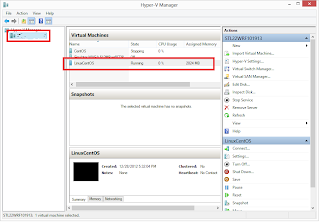
Now, the fun can begin! Launching the manager will give you access to create VMs. This is very cool and, as I mentioned, is part of the Windows 8 Pro operating system. You don't have to install any 3rd party software packages or costly virtual machine emulators. The screen shot, below, is from my Dell laptop running Win8. I have three VMs installed and the highlighted one is the Linux OS, CentOS.

It is very easy to create your own VM and Microsoft has done an excellent job providing a wizard approach to configuration. This blog entry just highlights the hyper-v feature and more details may follow with another blog entry.
But wait, there's more!
Before I wrap this up, I do want to bring to your attention another fantastic feature of Windows 8. Once you download the ISO you wish to install, all you have to do is right-click the ISO file, then select Mount. Mounting ISO files is a feature which is part of Windows 8. No longer needed are additional applications to help with using ISO files. Your mounted ISO will show up as a drive letter.
But wait, there's more!
Before I wrap this up, I do want to bring to your attention another fantastic feature of Windows 8. Once you download the ISO you wish to install, all you have to do is right-click the ISO file, then select Mount. Mounting ISO files is a feature which is part of Windows 8. No longer needed are additional applications to help with using ISO files. Your mounted ISO will show up as a drive letter.
I'll leave you with a final screen shot. It is from my VM, running CentOS. Enjoy!

Monday, December 17, 2012
Windows 8 Does Java
This is my Windows 8 start screen. Look closely at the red highlighted box. See it? Yes, your eyes are not deceiving you. This is, in deed, a tile with Eclipse on it. 64-bit Eclipse, Juno, downloaded from Eclipse.org. No modifications were needed.

My laptop is running 64-bit Java, from java.oracle.com, and I have not encountered any issues. Despite what you might hear, Windows 8 will do Java and makes for a decent development environment. I plan to post more information pertaining to Java; but, for now, I'll leave you with a screen shot of Eclipse and the obligatory Hello World application and some messages from the command prompt.


My laptop is running 64-bit Java, from java.oracle.com, and I have not encountered any issues. Despite what you might hear, Windows 8 will do Java and makes for a decent development environment. I plan to post more information pertaining to Java; but, for now, I'll leave you with a screen shot of Eclipse and the obligatory Hello World application and some messages from the command prompt.


Tuesday, December 11, 2012
Getting Started with Windows Phone 8 Dev.
How to get started developing for Windows Phone 8.
This is a great question and the answer is with mixed
feelings. I say mixed, because mobile
development has a few extra hurdles than the previous .netcf way. On the other side, Windows Phone 8 is a great platform and is in-line with modern XAML application development.
Before you get started, you need a computer running
64-bit Windows 8 Pro. Sadly, this has to be
on bare metal and not running under a VM.
The reason for this has to do with the Emulator. It requires hyper-v, so your computer must
also support Hyper-V (SLAT) . When you think about it, having the emulator
as a VM is pretty darn cool.
Once you have the basics down, you need to get yourself a
copy of Visual Studio 2012. If you don’t
already have VS 2012, you can download a free version of Express. The links at the bottom will help you find
the right version. Remember you need the version to support Windows 8 Phone.
If you are already running Visual Studio 2012, get the Windows Phone 8 SDK. The
SDK will add all the functionality you need to build Phone applications, which
includes the Emulator. With Win8, you can target Windows Phone 8 and 7.5.
After you have all of this downloaded and installed, and you've built an app running on the emulator, then you will want to take it for
a test drive on a real Windows Phone 8 device.
In order to do this, you have to get a developer’s license for the
Windows Store. Oh, and you will need a Windows Phone 8. I suggest the Nokia 920.
Lastly, you may want some help learning about developing
Windows Phone 8 apps. This link will direct you to the Windows Phone 8 Jump Start:
Links to help you
with Hyper-V
Windows 8, Pro
Visual Studio 2012
Windows Phone SDK
Developer’s
License:
Thursday, December 6, 2012
C# Parallel Tasks (for)
Recently, I’ve been working on a project requiring the
need to process very large quantities of data.
Many of the processes we have been writing can be broken up into
parallel tasks. While the .net
framework has supported multithreading since the beginning, the 4.0 version
introduced the System.Threading.Tasks
namespace. This is a nice collection
of classes to help make multithreaded programming a bit easier.
Looking at the MSDN documentation
You will see a number of classes. For this posting, I am going to zero-in on
the Parallel class.
Here you will find heavily overloaded methods For and ForEach,
both of these are methods to iteratively preform work on a thread. If you
have not looked at this before, it is a very welcome treat!
The first things you will add to your code are the using statements.
using System.Threading; // Thread
using System.Threading.Tasks; // Parallel
The Parallel class is found in System.Threading.Tasks,
but you may still want to use Thread,
which will require System.Threading.
The basic syntax is this…
Parallel.For(Int32,
Int32,Action<Int32>);
Argument 1, starting value (Inclusive)
Argument 2, ending value (Exclusive)
Argument 3, Action to perform
The premise is simple, you iterate just like you would a traditional for loop; however, unlike a traditional for loop, each iteration is performed in its own task (thread). I'm demonstrating a Parallel.For loop, but there is also a Parallel.ForEach.
Here is a very simple example:
using System;
using System.Threading;
using System.Threading.Tasks;
namespace ParallelSample
{
public class Program
{
public static void Main(string[]
args)
{
Parallel.For(0, 10, DoThis);
Console.Read();
}
public static void DoThis(int i)
{
//try adding a Thread.Sleep(5000);
//try adding a Thread.Sleep(5000);
Console.WriteLine("***
{0} ThreadID= {1}", i,
Thread.CurrentThread.ManagedThreadId);
}
}
}
On the other hand, using lambda expressions, you
might code something like this:
using System;
using System.Threading;
using System.Threading.Tasks;
namespace ParallelSample
{
public class Program
{
public static void Main(string[]
args)
{
Parallel.For(0, 10, i =>
{
Console.WriteLine("*** {0} ThreadID= {1}", i, Thread.CurrentThread.ManagedThreadId);
});
Console.Read();
}
}
}
This is but the very basics of the Parallel For. The example simply demonstrates how to set
your code up for multitasking iteration.
You will still need to follow the general rules for developing
multithreaded programs and implement thread safe code where applicable.
One thing I did not mention was the use of the
ParallelOptions object. This object can
provide some nifty features to your tasks, such a limiting the degrees of
parallelism with the MaxDegreeOfParallelism property. In the sample, below, I am using this object
to limit only three threads of execution at a time. This can help prevent overloading the server
with worker threads. Observe the overloaded For method. It takes the ParallelOptions object as an arguement.
public static void Main(string[]
args)
{
var po = new ParallelOptions() { MaxDegreeOfParallelism = 3 };
Parallel.For(0, 10, po, i =>
{
Console.WriteLine("*** {0} ThreadID= {1}", i,
Thread.CurrentThread.ManagedThreadId);
});
Console.Read();
}
Lastly, you may want to take into consideration, the
number of processors available. One way
to do this is to do the following:
Console.WriteLine(Environment.ProcessorCount);
When you run the examples, experiment and add additional code. Perhaps try a Thread.Sleep call and observe the output.
Monday, December 3, 2012
East Side Developer Group
One of the down-sides to living on the Illinois side of St. Louis is the lack of good technical interest groups. If you are serious about software development, or just interested in general technology, you will have to make a trek over to the Missouri side. The issue about going "Across the River" is not the distance or fear of driving over a bridge. The issue is having to drive 45 minutes to get home.
After a long day at the office, I want to get home, relax, and maybe read about some code. Going to a monthly SIG is fine, but it is that last hour which makes things so unattractive. If only there was something on the East Side...so that last hour is not so painful.
I am in the process of securing a very good location, with easy access to the Metro Link, Internet, overhead projection, and decent room accommodations This work-in-progress will be much easier if I had a good grasp of the number of people who may be interested in a monthly group.
If you are interested in attending, or interested in presenting, shoot me an email. Microsoft, Java, Open Source...everyone is welcome! WhatsTheBigIT@outlook.com
I hope to have some specifics in January, 2013.
Pass the word around.
After a long day at the office, I want to get home, relax, and maybe read about some code. Going to a monthly SIG is fine, but it is that last hour which makes things so unattractive. If only there was something on the East Side...so that last hour is not so painful.
I am in the process of securing a very good location, with easy access to the Metro Link, Internet, overhead projection, and decent room accommodations This work-in-progress will be much easier if I had a good grasp of the number of people who may be interested in a monthly group.
If you are interested in attending, or interested in presenting, shoot me an email. Microsoft, Java, Open Source...everyone is welcome! WhatsTheBigIT@outlook.com
I hope to have some specifics in January, 2013.
Pass the word around.
Saturday, November 10, 2012
Welcome
What's the Big IT?
Thank you for asking. This is my blog site where I talk about technology, hence the name What's the big IT.
Thank you for asking. This is my blog site where I talk about technology, hence the name What's the big IT.
Subscribe to:
Posts (Atom)